MergeLint
Find the images your merge will not find.
Point MergeLint at your CSV and the folder of links. It compares every image path against what is actually in that folder and names the records that will print blank, plus the header and row faults that break a merge outright. Nothing leaves your machine.
Runs in your browser. The file is not uploaded. Independent software, not affiliated with Adobe.
MergeLint
A local preflight for the source behind your next InDesign batch.
Run it on a real file.
Choose a file or drop one CSV / TXT here.
How to use
Choose a UTF-8 CSV or TXT, then choose the folder your images live in. The demo checks up to 1,000 data rows and compares every image path against that folder. The first issue is highlighted in Source proof; use Focus in source on any finding to inspect its row and field. Your original file is never changed.
Both the file and the folder are read in your browser. Neither is uploaded.
Local scan. Files stay in your browser.
Choose a file to see its scan results.
| # | Name | Role | Role | @Portrait |
|---|---|---|---|---|
| 2 | Ava Chen | Designer | Lead | ava.jpg |
| 3 | Liam Patel | Developer | Developer | liam.jpg |
| 4 | Mia Rossi | Editor | Editor | |
| 5 | Noah Kim | Manager | Manager | +1 field |
| 6 | Zoe Martin | Analyst | Analyst | zoe.jpg |
| 7 | Ethan Lee | Developer | Developer | ethan.jpg |
| 8 | Isabella Wong | Designer | Designer | isabella.jpg |
| 9 | Lucas Dubois | Manager | Manager | lucas.jpg |
| 10 | Charlotte Brown | Editor | Editor | charlotte.jpg |
| 11 | Arjun Singh | Developer | Developer | arjun.jpg |
| 12 | Grace Lee | Designer | Designer | grace.jpg |
Scroll horizontally to inspect every field.
Findings
A missing link does not stop the merge. It prints.
InDesign will merge a record whose image is missing, misnamed, or one letter off in case, and hand you a blank frame on the page. MergeLint finds those records first, by row and by field, while the source is still easy to fix. The scan runs in your browser. The file is not sent to a server.
Built for freelance InDesign designers and small print-production teams.
- Choose a source and its folder.Comma, tab, and semicolon delimiters. The folder is read in your browser, never uploaded.
- See which records will print blank.Missing files, case mismatches, ambiguous names, stray whitespace, plus header and row faults.
- Fix your working copy.MergeLint never overwrites the original.
It checks what goes in, not what comes out.
MergeLint stays on the part you can still repair before a batch: the delimited source and the folder of links you point it at.
Checks
Missing assets, case mismatches, ambiguous filenames, path whitespace, image-field conventions, blank and duplicate headers, uneven row widths, and decoding risk.
Does not check
INDD or IDML files, fonts, layout, overset text, merged output, PDF settings, print readiness, or Adobe application state.
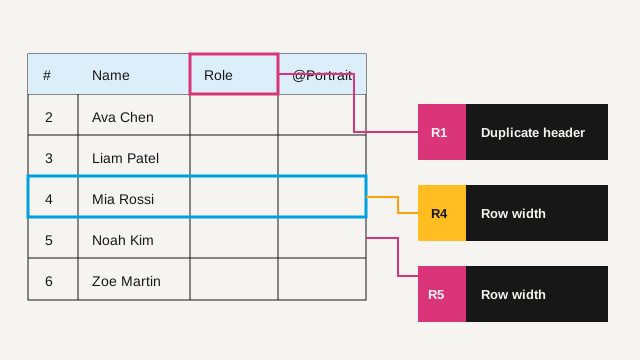
The report names the record.
Each finding has a stable code, severity, row, field, evidence, and next step. Export CSV or JSON from the offline version when the report needs to travel with the job.
Read the checking methodKeep it beside the job files.
$49 once
- Hand off CSV or JSON findings so the fix list travels with the job, and download a conservative clean copy when that is safe.
- Check up to 100,000 records and 25 MiB, for runs the demo will not take.
- Works with no network at all, so client data never needs a tab open.
- Browser app—not an EXE or InDesign plug-in. Unzip the download and open index.html in Chrome or Edge. No account needed.
No subscription. Request a refund within 30 calendar days of purchase. The checkout receipt delivers the ZIP.
Buy MergeLint for $49Checkout will open here after seller verification.
Before you use it
Does the web demo upload my source or my images?
No. The demo reads the selected file and the chosen folder in browser memory. It does not send file bytes, image data, filenames, or field values anywhere.
What are the demo limits?
The demo accepts up to 8 MiB and 250 fields and checks the first 1,000 data rows, including the full folder comparison. It cannot export a report or a clean copy. The offline package accepts up to 25 MiB, 1,000 fields, and 100,000 data rows, and exports.
Will it fix every finding automatically?
No. It can create a conservative clean copy when trimming headers or image paths is safe. Structural blockers stay visible for a person to repair.
Is MergeLint made by Adobe?
No. MergeLint is an independent tool and is not affiliated with or endorsed by Adobe.